

Someone finds your work through a post, recommendation, video, or event. They tap your profile link because they want the next useful thing. Your page should help them recognise where they have landed and choose that next step without decoding a long list of buttons.
Start by deciding what the page needs to do. The right content, order, and measurement become much clearer once that decision is made.
What “link in bio” means
“Link in bio” is the instruction people use when a post cannot carry the useful destination itself. The link lives on the account’s profile, usually near the short description of the person or business.
The destination can be one page, such as a booking form or product checkout. It can also be a small page that holds several relevant destinations. On Instagram, links are part of the account’s public profile information , so anyone who can view the profile can see them.
If you are adding or replacing the profile link itself, the guide to adding a link to your Instagram bio shows the current setup screens, title examples, and ways to earn the tap.
A bio link is a common part of a creator profile, but its use varies with the account. Pew Research Center analysed creator accounts followed by US adults on TikTok and found that 58% included a link in their bio. That rose from 33% among the least-followed creators in its sample to 82% among the most-followed. Linktree accounted for 34% of the bio links Pew observed. The study covered accounts with at least 5,000 followers, so it describes that population rather than every TikTok account.
A link-in-bio page is useful because one stable URL can keep working while the content behind it changes. You can feature a new release this week, a workshop next month, and your archive after that without editing every old post that points to the profile.
Decide whether you need a page
Use the simplest destination that completes the visitor’s job.
| Situation | Better destination | Reason |
|---|---|---|
| One campaign has one timely action | Direct link | The visitor can act without another choice. |
| People arrive with different levels of context | Link-in-bio page | The page can explain who you are and offer a few valid routes. |
| You want to collect an email, response, or enquiry on the page | Link-in-bio page | The action can happen without sending the visitor through another homepage. |
| A post promises one specific resource | Direct link or comment-to-DM | The route can deliver exactly what the post promised. |
| Your website already has a focused mobile landing page | Existing website page | Another layer may add work without helping the visitor. |
A page earns its place when it helps someone choose. If every visitor needs the same product checkout today, link to the checkout. If one person wants your latest work and another wants to book you, a page can give both a clear route.
Choose one job for the page
This guide uses one planning rule: write the primary job before choosing Blocks or colours. “Show everything I do” is difficult to order and difficult to measure. “Help a new visitor book a project call” gives the page a useful centre.
Answer these six questions before opening an editor. The example shows how an illustrator might plan a free colour guide.
Plan your page
Write one short answer for each question. If an answer needs a paragraph, the page job is probably still too broad.
Worked example: Illustrator's free guide
Who is arriving?
Example answer: People who saw a short colour tutorial on Instagram.
Where did they come from?
Example answer: A Reel and the profile link beneath it.
What should they be able to do?
Example answer: Get the one-page colour guide.
What helps them choose it?
Example answer: A preview image and one sentence about what the guide covers.
Which alternatives still matter?
Example answer: View recent illustration work or ask about a commission.
What event shows the page did its job?
Example answer: A completed email capture for the guide.
The page can now be planned around that answer. The guide belongs first. Recent work and commissions remain available, but they do not compete for the opening position.
Four page plans to borrow
Start with the page closest to the result you want.
Audience growth
Deliver a free resource
Lead with a preview and an email-gated checklist. Keep tutorials and contact details below it.
Primary action: Get the checklist
Success signal: Completed email capture
Upcoming offer
Collect waitlist interest
Show the workshop, two finished pieces, and a short signup Form. Put the studio archive below.
Primary action: Join the workshop list
Success signal: Completed signup Form
Services
Turn interest into a booking
Pair a short introduction with two projects, one testimonial, and a project enquiry Form.
Primary action: Ask about a project
Success signal: Qualified enquiry
Digital product
Give buyers a direct path
Show the result, list what is included, answer common questions, and link to your existing checkout.
Primary action: View the preset pack
Success signal: Checkout visit, with purchases confirmed by your sales provider
The order changes because the promise changes. A waitlist page needs enough context to make a future offer feel real. A service page needs proof before the enquiry. A low-cost digital product may be ready for a direct checkout after one clear demonstration.
Build the first screen
The first screen should answer four questions without requiring a scroll.
- Whose page is this? Use a recognisable name, image, and short description.
- Why would I stay? Connect the page to the work, post, or recommendation that brought the visitor here.
- What should I do next? Give the primary action a specific label.
- Can I trust the destination? Show enough proof or context to make the action feel expected.
W3C guidance says link text should describe the purpose of a link so people can distinguish between destinations before choosing one. “Learn more” hides that purpose. “See the workshop dates”, “Get the colour guide”, and “Ask about a project” describe what will happen.
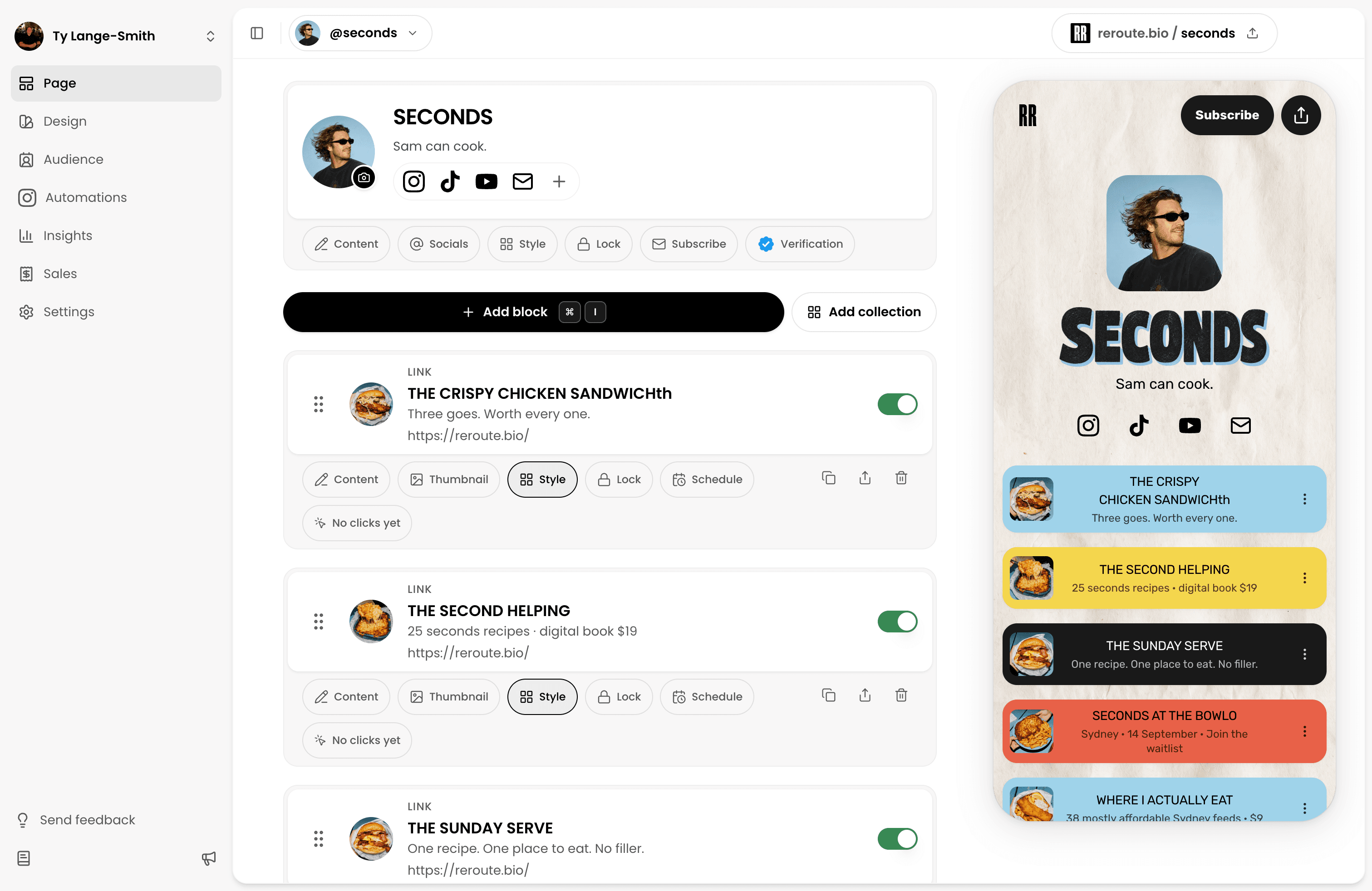
In  Reroute, a page can combine profile details, links, text, images, Forms, FAQs, maps, collections, media, and Digital Products. Add the Blocks that support the page job, then stop. A Block that cannot answer a visitor question or support the intended action is a candidate for removal.
If you are choosing the software as well as planning the page, the Linktree alternatives comparison explains how focused page builders, newsletters, storefronts, and social scheduling tools differ.
How many links should a link-in-bio page have?
There is no universal optimum. A musician with several current releases may need more routes than a consultant booking one service. Use a pruning test instead:
- Does this destination help the person described in the page plan?
- Is it current?
- Would removing it make the page less useful?
- Does its position reflect its importance?
Move archive material below current work. Remove expired offers. Combine destinations that ask the visitor to make the same decision.
Make the page recognisable
Carry over the identity people saw before they tapped. Use the same name, a familiar image, and language that sounds like the surrounding work. This applies a broader usability principle: recognition requires less cognitive effort than recall . The visitor should be able to recognise the person, business, or offer without remembering details from the previous screen.
Linktree reports that pages with a profile description and customised theme receive twice as many clicks on average . Its analysis covers Linktrees created since October 2024 and does not publish a causal method, so treat the result as an association inside Linktree’s own product. The practical lesson is modest: identity and context deserve space on the page.
Design still has to work on a phone. Test the published page at a narrow width and use a real thumb, not only the editor preview. WCAG 2.2’s minimum target-size guidance uses 24 by 24 CSS pixels, subject to exceptions, and explains why sufficient size or spacing helps people using touchscreens and people with limited fine motor control.
Phone test
The name and primary action are visible without searching.
Button labels remain clear when they wrap onto two lines.
Text stays readable over the chosen colours or image.
Every destination opens the expected page.
Forms, downloads, maps, and checkout steps work without a desktop browser.
Old campaigns and unavailable offers have been removed.
Publish the page
Place the page anywhere people already look for the next step. Platform rules are different:
- Instagram exposes profile links as public information.
- TikTok says a personal account needs at least 1,000 followers to add a website, while a verified Business account has a separate eligibility route. The TikTok bio-link setup guide explains verification, the music tradeoff, and what to do when the website field is missing.
- YouTube supports up to 14 channel profile links , with the first shown prominently.
- LinkedIn allows up to 3 website links in Contact info.
Those extra slots do not remove the value of a considered page. One page can preserve the same identity, explanation, and measurement across several platforms. It also gives you one URL to print on a QR code, place in an email signature, or mention in a video.
Reroute provides a stable page URL
and QR sharing. When the page’s current priority changes, update the Blocks
behind that URL instead of replacing the link everywhere it has been shared.
A profile link is only one route. If an Instagram post makes a specific promise, a comment can trigger the delivery directly. The guide to turning Instagram comments into clicks, signups and sales covers that complete comment-to-DM workflow.
Measure whether it worked
Choose the success event from the page plan before reading the numbers. A click may be the final action when the destination is a song or article. A service page still needs the scheduler or enquiry Form to record what happened after the click.
| Stage | Useful question | Where to measure it |
|---|---|---|
| page visit | Did people open the page? | page views and unique visitors |
| page action | Which Block did they choose? | Block clicks and Form responses |
| Downstream result | Did they book, buy, subscribe, or download? | The relevant Form, scheduler, store, or checkout |
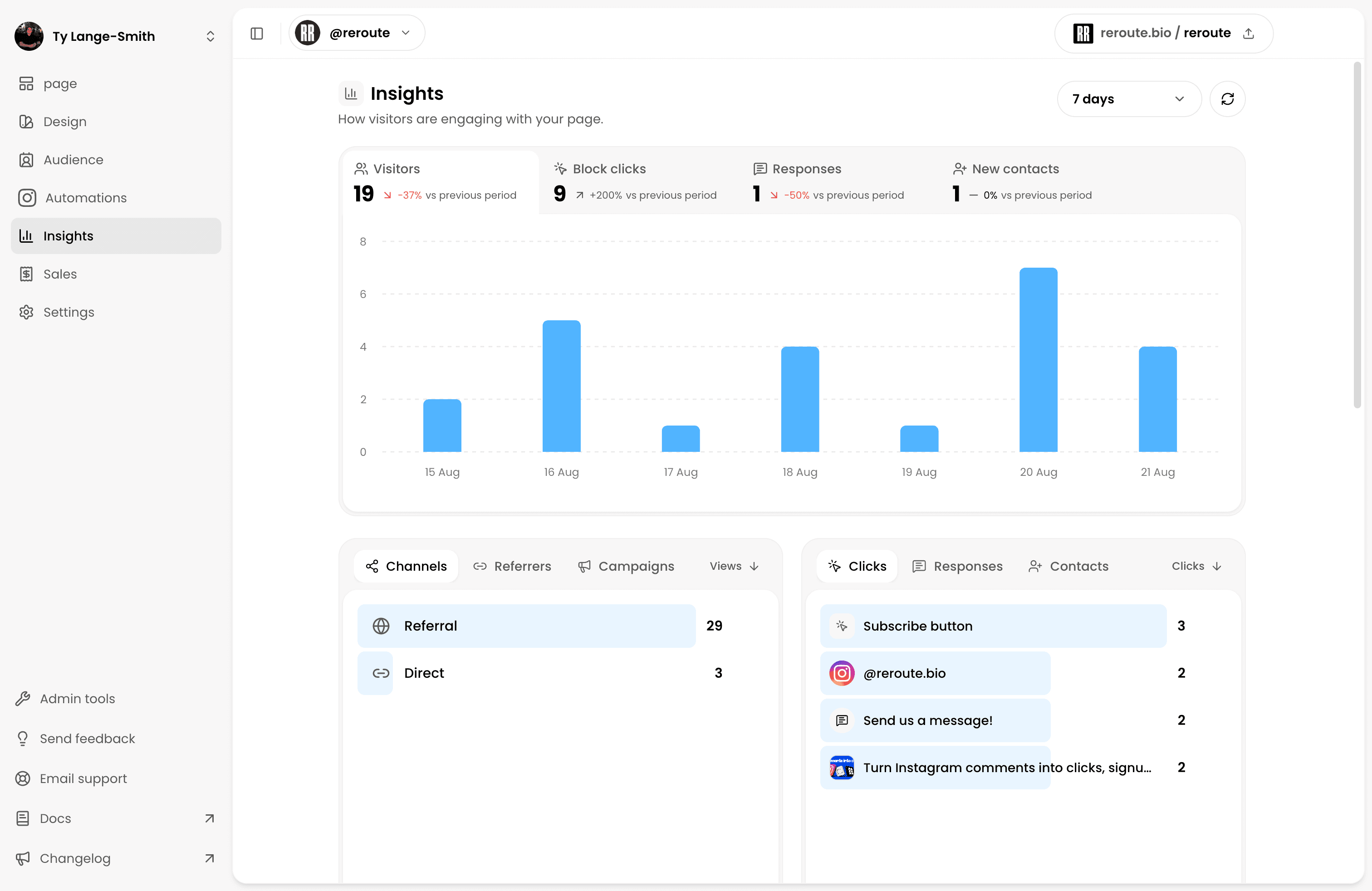
Reroute Insights shows page
views, unique visitors, Block clicks, responses, referrers, locations, devices,
campaigns, and audience growth. The last stage may live elsewhere. An external
checkout records its own purchase, and an external scheduler records its own
booking.
When you control the external destination, campaign parameters can connect the page click to the next analytics system. Google Analytics recommends using consistent utm_source, utm_medium, and utm_campaign values so referred visits can appear in its traffic-acquisition reports. Keep the names stable and lowercase because parameter values are case-sensitive.
For a simple page-level review, calculate:
Keep the scope and time period consistent. A high click-through rate with few completed bookings points toward the destination or offer. Very few clicks may point toward the page order, primary label, or mismatch between the visitor and the page promise.
If most visits start on Instagram, the Instagram bio-link analytics guide explains which activity stays anonymous, how to compare campaigns, and what to change at each stage.
Later’s link-in-bio analytics documentation uses the same broad measurement vocabulary, including page views, button clicks, post clicks, and click-through rate . Metric definitions vary between products, so read the label before comparing numbers from two systems.
Make one change at a time. Move the primary action, rewrite its label, or remove a stale route. Record when the change happened and compare the same metrics over the same period. Treat movement from a small number of visits as a prompt to keep watching, not proof that one version will always perform better.
Common link-in-bio problems
| What the visitor experiences | What to change |
|---|---|
| The page could belong to anyone | Add a recognisable name, image, and one useful sentence. |
| Every button appears equally important | Choose a primary action and move supporting routes below it. |
| A label hides the destination | Replace “Learn more” with the action or item the visitor will find. |
| The page is full of expired campaigns | Remove unavailable offers and move archives below current work. |
| Clicks are healthy but signups or sales are low | Test the destination on mobile and inspect its own completion steps. |
| Traffic arrives but nobody clicks | Check whether the page answers the promise made by the source post or profile. |
Frequently asked questions
Plan the page before adding Blocks
Complete the six page-plan questions, choose the primary action, and order the supporting content around it. Then publish the page and test the whole route from the profile to the final action.
Create your page