

No. Instagram does not show you the names, usernames, or profiles of people who clicked your bio link. A third-party tool cannot recover their identity from that tap either.
Reroute can show where an anonymous visit came from, which Blocks someone chose, whether they submitted a Form, and whether their email created a Contact. Together, those events explain what happened after the tap.
What Instagram can show you
Instagram Insights is available to professional Creator and Business accounts. It reports measures such as views, reach, interactions, and, depending on your account, aggregate profile activity or external-link taps.
To check your reporting:
- Open your Instagram profile in the mobile app.
- Tap View professional dashboard or Insights.
- Check your account overview for a link-related count and select a date range.
The professional dashboard requires a professional account and the Instagram mobile app . Available metrics and labels vary, but you will not find a list of the accounts behind individual taps.
A Story may have a viewer list, but tapping its link sticker is a separate action. The viewer list does not tell you who opened the destination.
If you still need to add the destination itself, start with the guide to adding a link to your Instagram bio.
Follow the visit beyond the tap
An Instagram bio link can send someone to a page that records what happens next. Each stage has its own evidence.
Profile tap
Someone opens your Instagram bio link.
Page visit
Your page loads and records an anonymous visit.
Page action
The visitor opens a Block or completes a Form.
Known contact
An email creates a Contact when someone chooses to share it.
Not every visit reaches every stage. Here is what each platform can actually show:
| InstagramActivity on your profile and content | RerouteWhat happens after the tap | |
|---|---|---|
| Visitor identity | No list of bio-link clickersNot available | Anonymous visitor aliasesPrivacy-safe |
| Traffic sources | Profile activity and link tapsAccount dependent | Channels, referrers, campaignsIncluded |
| Visitor journeys | No destination-page activityNot available | Page visits, Block clicks, outcomesIncluded |
| Forms and Contacts | No emails supplied by a link tapNot shared | Responses and submitted emailsVoluntary |


A page view, Block click, and completed purchase are separate interactions, as Google’s event documentation also explains. A click cannot prove an external booking or purchase finished.
See what Reroute Insights actually measures
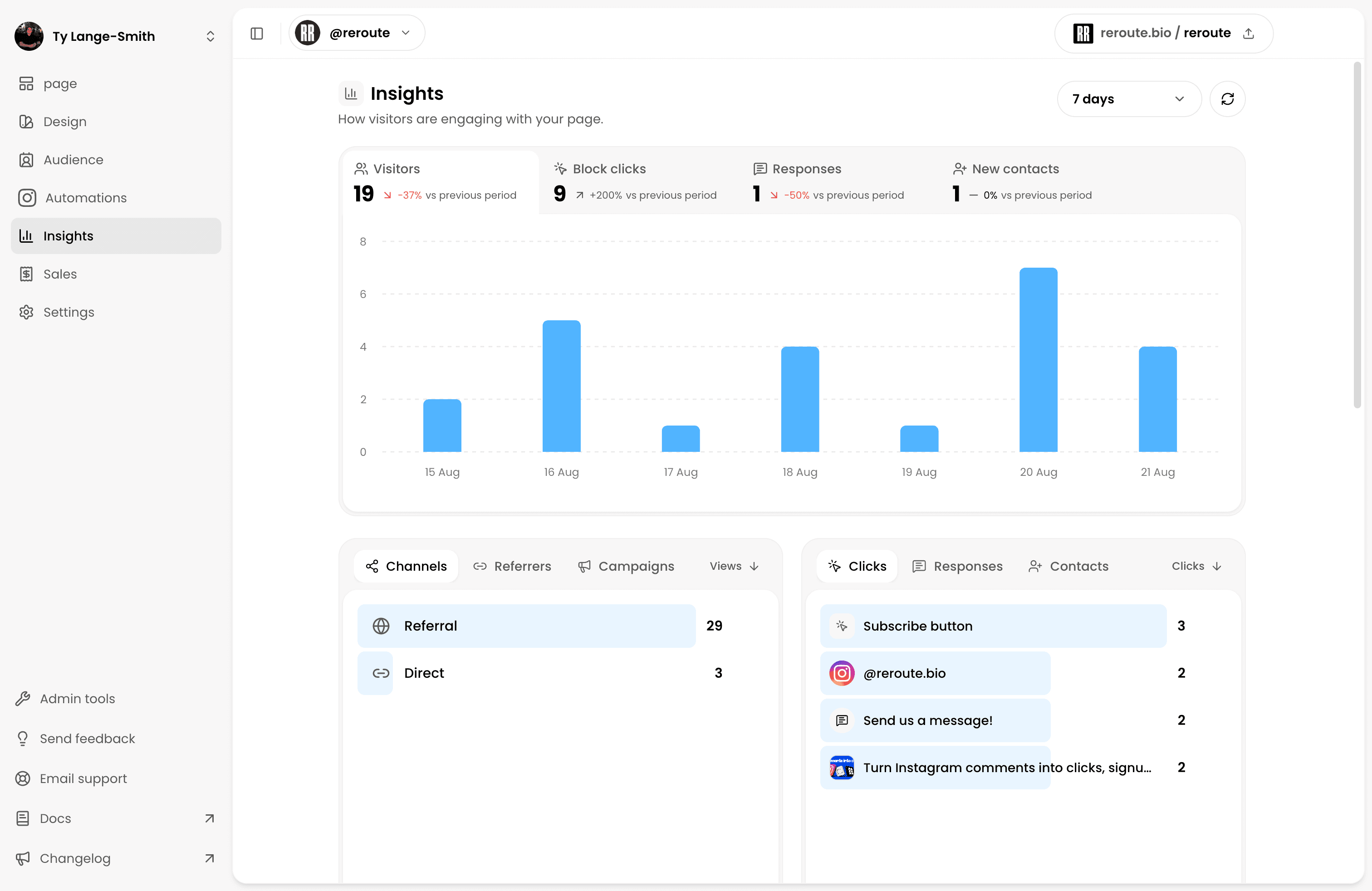
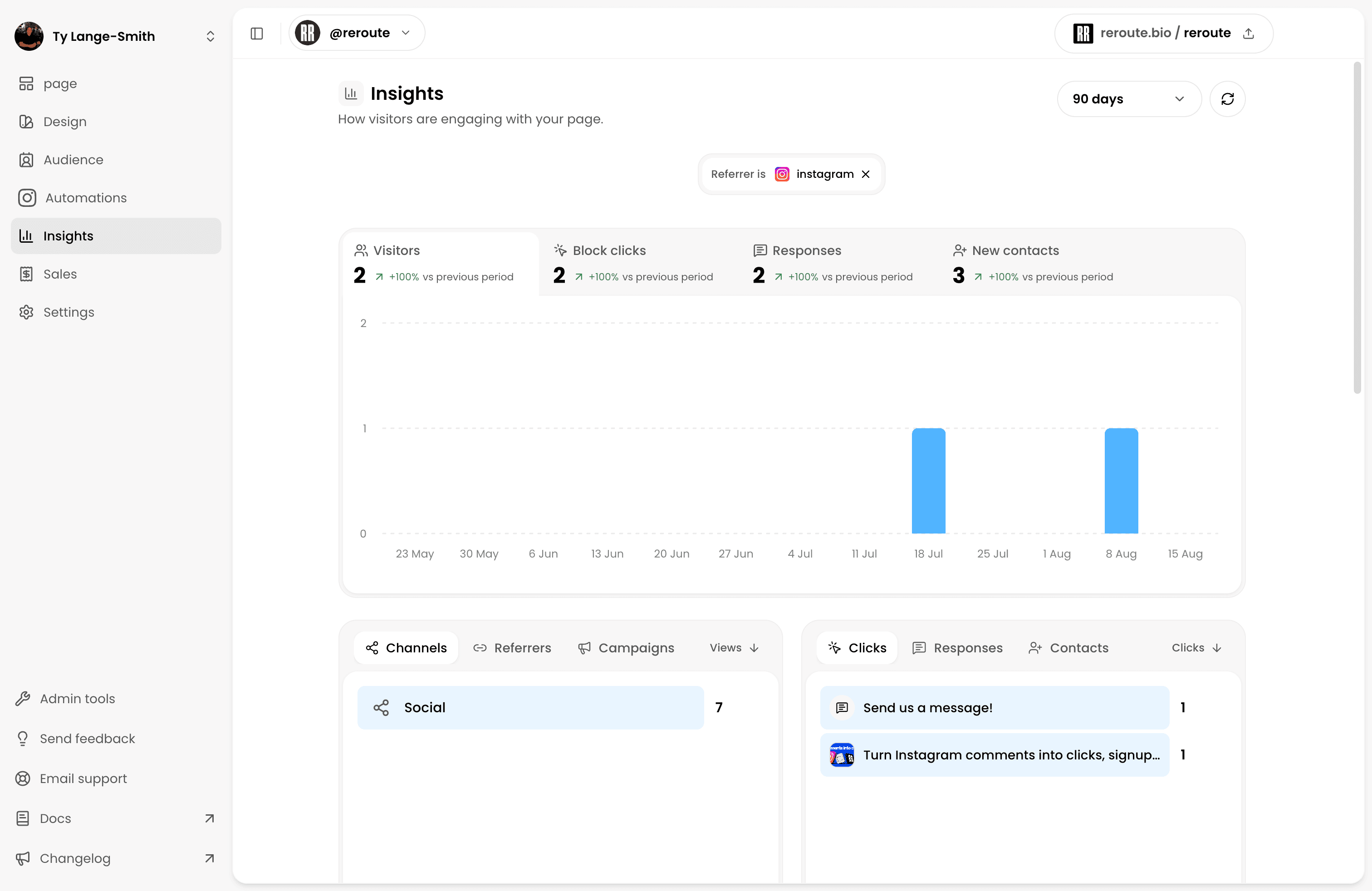
 Reroute Insights opens with
four measures: Visitors, Block clicks, Responses, and New
contacts. Its chart shows how the selected measure changed over time.
Reroute Insights opens with
four measures: Visitors, Block clicks, Responses, and New
contacts. Its chart shows how the selected measure changed over time.
Below it, acquisition switches between Channels, Referrers, and Campaigns. Engagement switches between Clicks, Responses, and Contacts.
Traffic sources
See where attention came from
Compare Instagram, other referrers, direct visits, and named campaigns.
Recent visits
Follow a particular visit
Open an anonymous visit to see its source, context, and actions in order.
Engagement
Find the Blocks people choose
See which links and Blocks actually receive clicks.
Response journeys
Attribute a Form Response
Connect a Form submission to the exact visit and source that produced it.
Contacts
See which Forms grow your Audience
See which Forms turn submitted emails into reachable Contacts.
Creator filters
Inspect one meaningful group
Filter the entire report by source, campaign, Block, outcome, or visit.
Other panels show Countries, Regions, Cities, Browsers, OS, and Devices. These describe visit context, not someone’s identity.
Free includes the last 7 days and up to 5 rows per breakdown. Creator adds 30-day, 90-day, and all-time history, complete lists, and report-wide filters.
Follow an anonymous visit through its page journey
Recent visits shows each anonymous visitor alongside its Source, Outcome, Duration, and Last seen time.
Open a row to see its source, location, device, and recorded Journey:
- The visitor arrived from Instagram or another source.
- The page opened with a campaign such as
workshop_bio, when present. - They clicked a Block, submitted a Form, or subscribed.
Open a clicked Block or its linked Response directly from the journey. Creator can also filter the entire report to that exact visit.
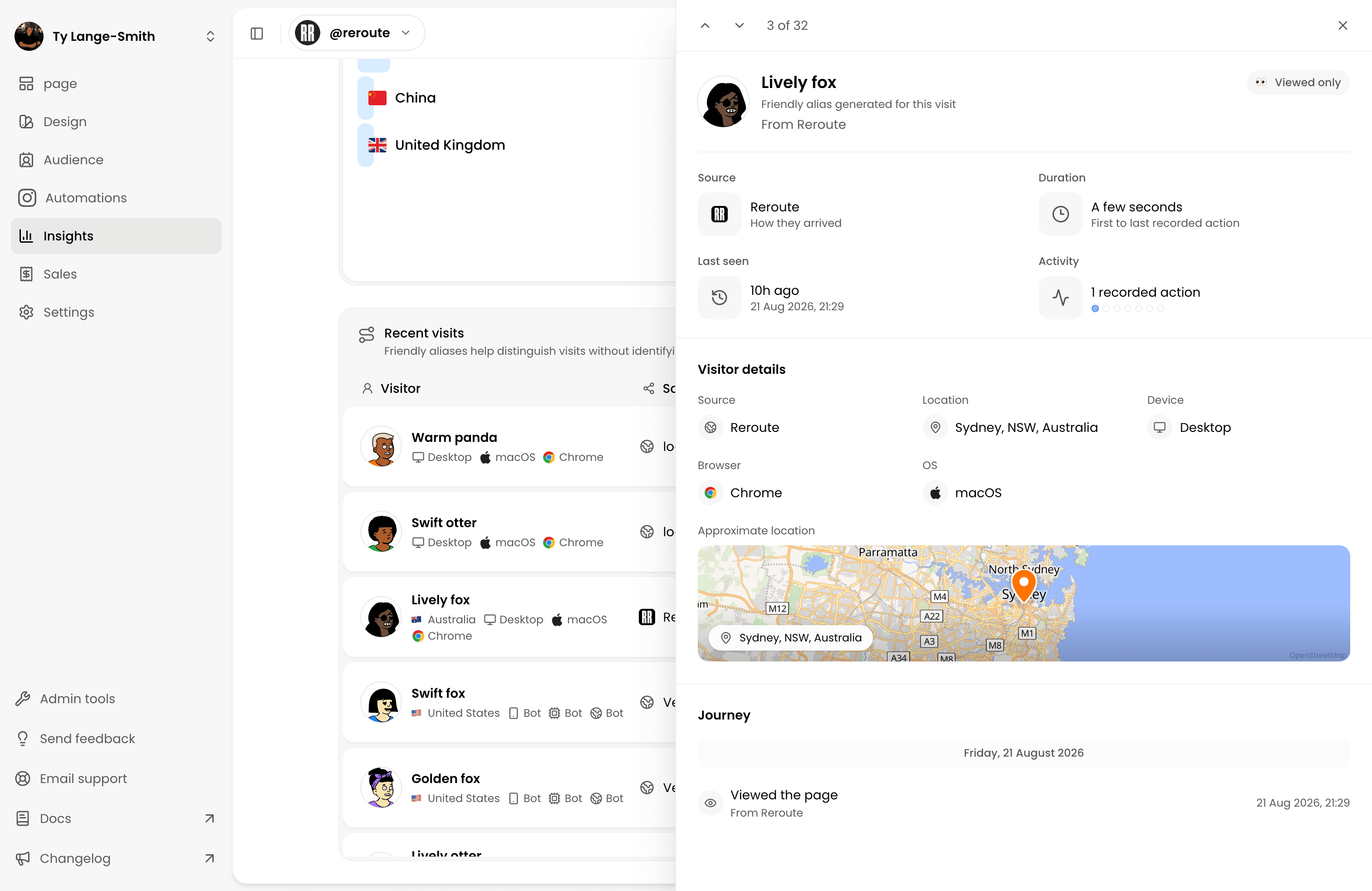
Actions are linked to the same observed visit, never guessed from similar timestamps. Labels such as “Lively fox” are generated aliases, not someone’s Instagram identity.
Connect a Form Response to the visit that produced it
Open Responses, select a submission, and view its Journey. When Reroute can associate the Response with a visit, it shows the source, campaign, and preceding page actions.
Response detail connects:
- Source: The observed platform and campaign.
- Response: The submitted Form or signup.
- Contact: The person created when someone shared an email.
Open the Response from Insights or follow it backward from Audience. Contact detail also keeps that email’s Response history together.
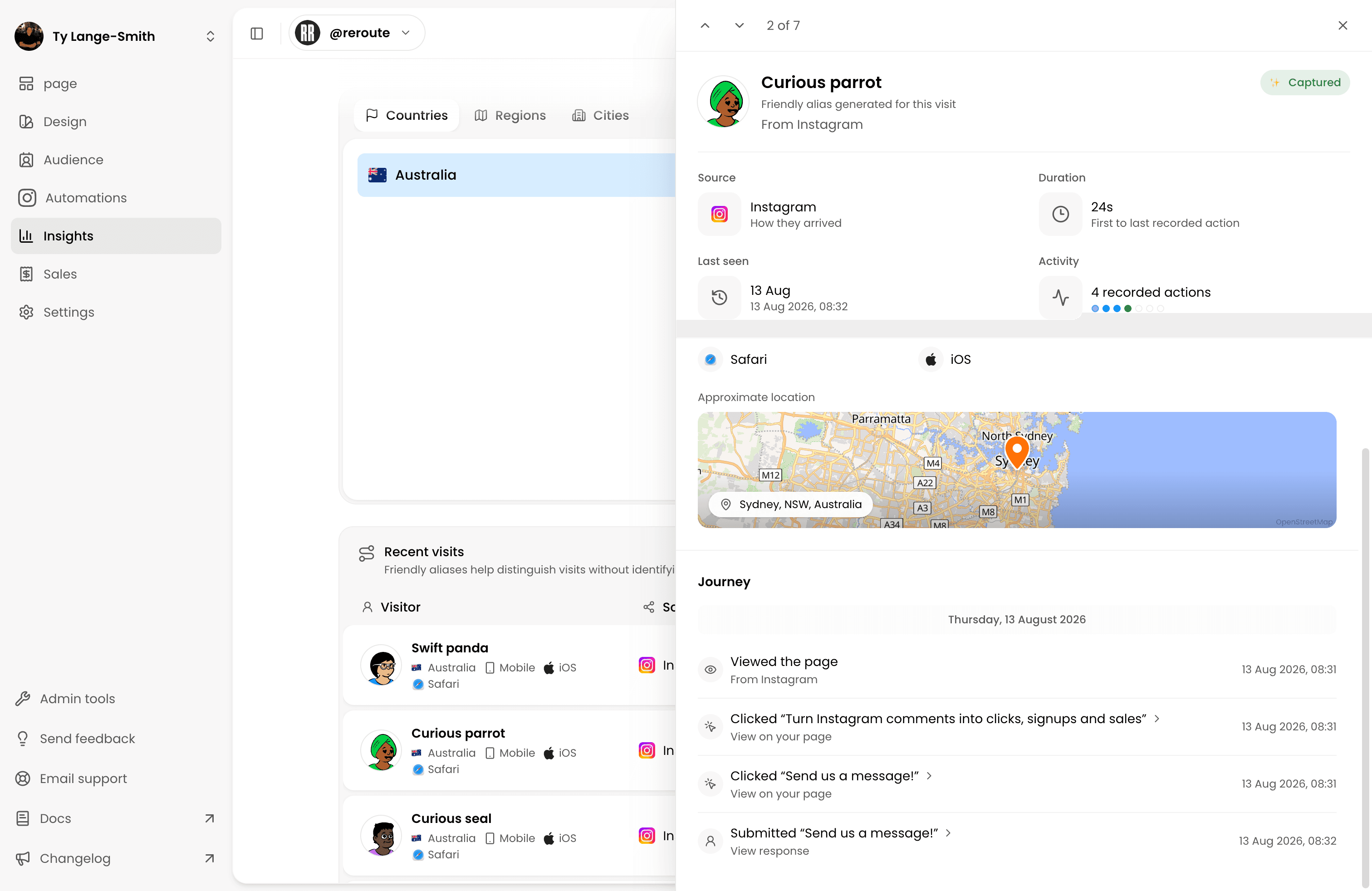
If no exact visit is available, Reroute shows the Response without inventing a journey.
Know when an anonymous visitor becomes a Contact
A visitor becomes a Contact only after actively submitting an email through a Form, signup, or another supported action. That submission creates a Response and can create or update a Contact in Audience. The email comes from the person, never from the Instagram tap.
Signing up for future updates is separate permission. An enquiry or resource request does not automatically mean someone agreed to receive a newsletter. The guide to building your Audience explains the difference.
Response capture is unlimited. Free lets you manage your newest 10 Responses; Creator unlocks the complete history.
Be cautious with tools promising to identify every visitor. Meta explains that apps receive non-public information only when someone shares it .
Tag your Instagram traffic so you can compare routes
Browser referrer policies can omit information shared with a destination . Campaign parameters give you another way to recognise Instagram traffic.
Google documents three standard campaign fields :
utm_source: the platform, such asinstagram.utm_medium: the placement, such asbioorstory.utm_campaign: the campaign or route to compare.
For your Instagram bio:
https://reroute.bio/studio?utm_source=instagram&utm_medium=bio&utm_campaign=workshop_bio
For a Story:
https://reroute.bio/studio?utm_source=instagram&utm_medium=story&utm_campaign=workshop_story
Reroute reads all three values, but Campaigns is the visible comparison. Give each route a different utm_campaign; changing utm_medium alone does not create a separate breakdown.
Some analytics tools report source and medium separately. Reroute compares named campaigns, not a standalone medium breakdown.
Keep campaign names consistent and never include personally identifiable information .
Read the numbers without inventing a conversion rate
Suppose one period produces 200 page views, 170 visitors, 46 Block clicks, 12 Responses, and 10 new Contacts. As Google’s explanation of traffic-source scopes shows, visitors and events are different measurements.
| Question | Calculation | What the result actually says |
|---|---|---|
| How often did someone choose a page action? | 46 Block clicks divided by 200 views | 23 Block clicks per 100 page views. |
| How often did a page view produce a Response? | 12 Responses divided by 200 views | 6 Responses per 100 page views. |
| How often did visitors become new Contacts? | 10 new Contacts divided by 170 visitors | About 5.9 new Contacts per 100 visitors. |
These figures are illustrative, not benchmarks. One visitor can click several Blocks, so clicks per view are actions per view, not a unique-person conversion rate, and can exceed 100%.
Instagram taps and recorded page views may differ because of repeat taps, interrupted loads, blocked measurement, or different reporting windows. Unattributed activity remains in overall totals but cannot be assigned to a filtered campaign.
Fix the stage where people stop
Start with the earliest weak step:
| What you see | What it may mean | First change to test |
|---|---|---|
| Few people tap the bio link | The offer is unclear. | Replace vague copy with a specific promised result. |
| Taps exceed recorded page views | The destination may not load. | Check the complete URL, redirects, and reporting dates. |
| Page views are high, but Block clicks are low | The next action is buried. | Move one clearly named Block higher and remove competing choices. |
| Clicks are high, but Responses are low | The offer or Form creates friction. | Explain the benefit, remove fields, and test the submission. |
| Responses arrive without new Contacts | The Form may not collect email. | Add an email field when a reachable Contact is the goal. |
| External clicks do not produce bookings or sales | The destination does not finish the job. | Check availability, pricing, mobile usability, and checkout. |
Keep your profile promise and first page action consistent. The link-in-bio planning guide explains how to organise Blocks around that next step.
Frequently asked questions
Find the next action worth improving
You cannot recover an Instagram account name from a bio-link tap. You can follow the route from an anonymous visit to a chosen page action, then recognise someone when they decide to share their details.
Open Insights, choose one outcome, and fix the first stage where the route stops making sense.
Open your Insights