

An Instagram post can keep working after you put your phone down. Ask people to comment a word, and  Reroute can send each person the promised link in a private message.
That link might open a free guide, a waitlist, a booking page, a product checkout, or a useful part of your Reroute page. Someone asks. The right thing arrives.
Instagram automations are awaiting Meta approval
Reroute’s Instagram automations are built, but public Instagram connections cannot be enabled until Meta approves our app. The setup below shows how the feature will work once approval is complete.
Suppose you publish a Reel showing how you colour-grade a photo. The caption says, “Comment PRESET and I’ll send you the pack.” A viewer comments at 11:47 pm. Reroute sees the keyword, leaves an optional public reply, then sends a private message with your checkout link. You can be asleep. The viewer still gets a timely next step.
1. Someone comments

robinmakes 2m
PRESET please
ReplyHide

northlightstudio 1m · Author
Sent. Check your DMs.
Reply
2. The link arrives privately
northlightstudio messaged you about a comment you made on their post. See Post
Here’s the colour preset from the Reel. I included the quick setup notes too.
View the preset
Comment-to-DM handles a promise made by one post. Your profile link remains the everyday route for everyone else who visits the account. The guide to adding a link to your Instagram bio explains how to set up that stable route and give people a clear reason to tap it.
This route fits the way people already use Instagram. Meta says messaging is now the most popular way people share photos and videos on Instagram , while Reels are reshared more than 4.5 billion times each day across Meta’s apps. The public post creates the interest. The DM gives that interest somewhere useful to go.
What an Instagram auto reply means
People use “Instagram auto reply” for 3 different features:
- Saved replies are snippets you insert while answering a message yourself. Instagram lists them as a tool in the professional dashboard .
- Instant replies respond when someone opens a new conversation with your account. They are configured in Meta Business Suite .
- Comment-to-DM automations use Meta’s private replies to send a private message after someone comments on a post or Reel.
This guide covers comment-to-DM.
Comment-to-DM is useful when the caption makes a clear promise. “Comment MENU and I’ll send today’s menu” gives the automation a job it can complete. A generic “drop a comment below” post gives it very little to work with.
The account you need
Instagram messaging integrations require a professional account. Instagram calls these Creator and Business accounts . Personal accounts need to be switched before they can connect to Reroute.
How comment-to-DM works
Publish
Promise one useful thing and name the keyword.
Comment
Someone comments PRESET on the post or Reel.
Deliver
Reroute replies and sends the
link privately.
Open
They continue to your page, form, or checkout.
Meta calls the first message a private reply. It can be sent to someone who comments on a professional account’s post, Reel, ad post, or Live broadcast. If the person follows you, the message usually lands in their Inbox. Otherwise, it may appear in Message Requests .
Meta sets 3 important limits :
- The initial private reply must be sent within 7 days of the comment. For Live broadcasts, it must be sent while the broadcast is live.
- You get one initial private reply for that comment.
- If the person answers, you can continue the conversation inside Instagram’s standard 24-hour messaging window.
Put the promised link in that first message. Asking for another reply adds friction, especially when the message has landed in Requests.
Choose one useful outcome
Start with the destination. Decide what someone should be able to do after they tap the message button. Then write the post and keyword around that action.
Free resource
Caption idea
“I turned my launch checklist into a one-page guide. Comment CHECKLIST and I’ll send it to you.”
Destination
A free Digital Product on your Reroute page, with an optional email capture.
Audience
Caption idea
“I’m opening 10 spots for my Sunday studio notes. Comment NOTES and I’ll send you the signup page.”
Destination
A waitlist, newsletter form, or Subscribe Block.
Services
Caption idea
“Thinking about a brand refresh? Comment BOOK and I’ll send you the project guide and booking link.”
Destination
A focused service page or your existing scheduler.
Digital product
Caption idea
“This is the preset I used for the whole series. Comment PRESET and I’ll send you the pack and examples.”
Destination
Your product checkout, with the click recorded in Automation activity.
The digital product version can run while you sleep, but automation cannot rescue an unclear product. The post still needs to show why the preset, template, guide, course, or download is worth paying for. The message simply removes the delay between “I want that” and the checkout.
One post, one prompt, one destination
The cleanest campaigns have a narrow shape:
- The post teaches or demonstrates something connected to the offer.
- The caption names exactly what the commenter will receive.
- One memorable keyword starts the automation.
- The message contains one button leading to one destination.
If a caption asks people to comment INFO for a guide, a price list, a newsletter, and a booking link, the private message has to make the decision the post avoided. Split those jobs across separate posts or send people to a focused Reroute page.
Set it up in Reroute
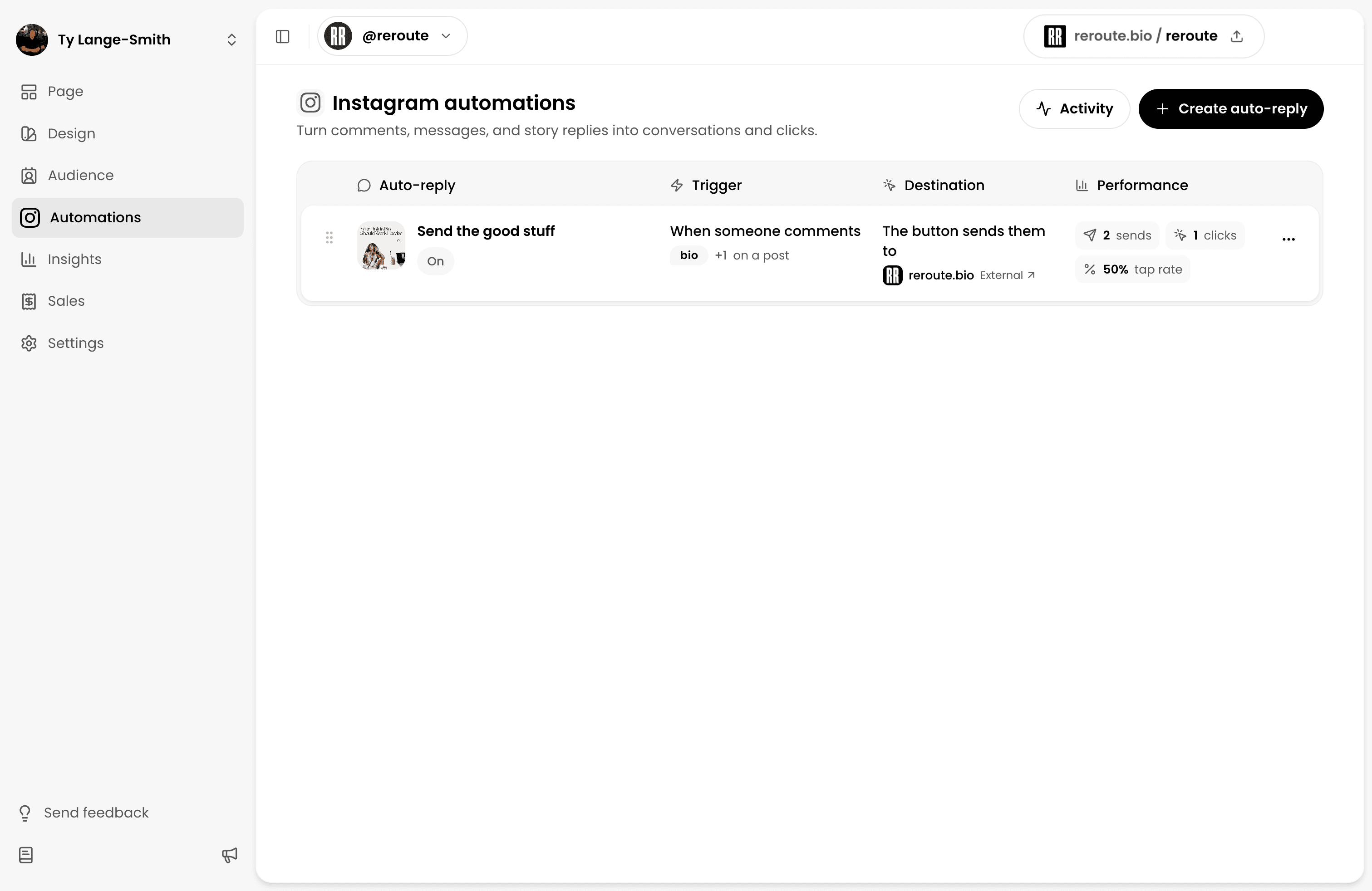
1. Connect a professional Instagram account
Open Automations in Reroute and connect your Instagram Creator or Business account. During connection, Instagram shows the permissions Reroute needs to receive new comments and send replies.
Reroute listens for new events
after connection. It does not fetch your old inbox or publish posts.
2. Choose which comments should count
Create an Automation and select Instagram comment as the trigger. You can watch:
- all posts going forward;
- the next post you publish; or
- up to 20 specific posts or Reels.
Then choose between every comment and a keyword match. A keyword is usually clearer for the audience and easier to measure.
Format affects the kind of engagement you can expect. A 2026 Socialinsider study of 15 million posts reported a comment rate of 0.06% for Reels, 0.04% for carousels, and 0.03% for images. The study covered 417,130 active pages and measured comments as a share of followers, so treat the figures as context rather than a forecast for your account.
That does not make every Reel a good trigger. Use the format that demonstrates the promised result most clearly, then compare comment rate across your own posts.
Reroute ignores case and
punctuation while matching. The keyword guide will match “GUIDE”, “guide
please”, and “Can I get the guide?” You can add up to 10 keywords, which is
useful for common variations such as price, pricing, and cost.
3. Add an optional public reply
A short reply under the comment tells the person where to look. “Sent. Check your DMs” is enough.
For busy posts, Reroute can rotate up to 10 reply variations. Keep each one plain and mention Message Requests in at least one.
4. Write the private message and button
Put the promised item in the first message. Name it again, add one useful detail, and use a specific button label such as “Download the guide” or “View the preset”.
The destination can be an external URL or part of your Reroute page. You can point directly to a page, a Subscribe Block, a free Digital Product, or another Block that fits the campaign.
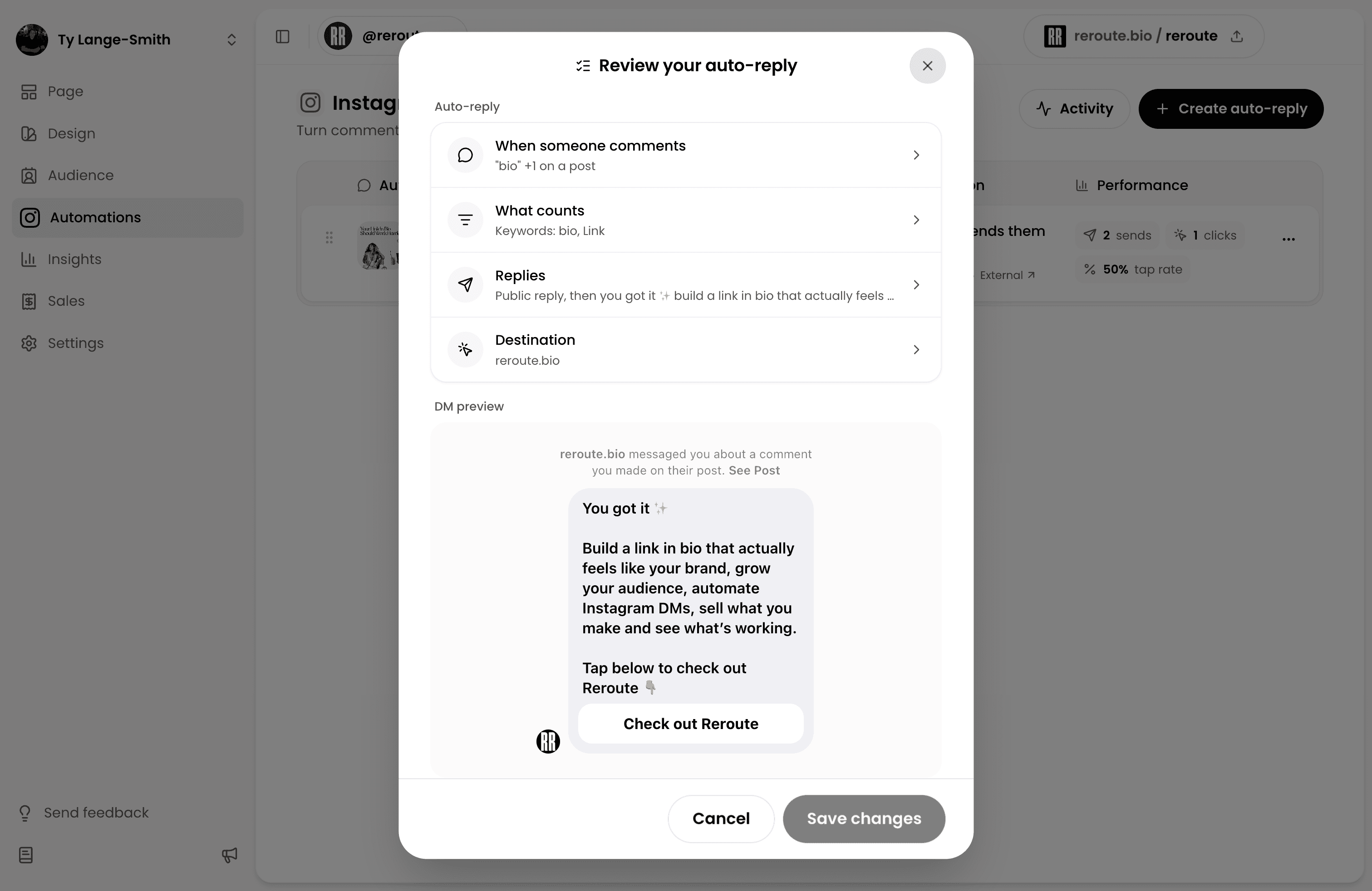
5. Preview, test, then turn it on
Send yourself a preview, open the link on your phone, and complete the next action. Then turn on the Automation and test the live post from another Instagram account.
Before you publish
The caption says what the commenter will receive.
The keyword is short, memorable, and easy to spell.
The first private message contains the promised link.
The button label describes the destination.
The destination works on a phone without signing in unnecessarily.
A test from a second Instagram account completed the whole route.
Write messages people want to receive
Write the message as a straightforward delivery note. The person already asked, so answer directly.
Free resource
You have a guide, checklist, or template.
1. Ask in the post
Comment CHECKLIST and I’ll send you the one-page version.
2. Deliver it privately
Here’s the checklist from the post. It covers the final checks I run before a launch.
Digital product
The post shows a paid download in use.
1. Ask in the post
Comment PRESET and I’ll send you the pack and examples.
2. Deliver it privately
Here’s the preset pack from the Reel. The page includes all 12 presets and setup notes.
Waitlist
You are collecting interest before a launch.
1. Ask in the post
Comment EARLY and I’ll send the workshop outline.
2. Deliver it privately
Here’s the outline. Join the list for the date and booking link before they go public.
“I’ll send it” sets an honest expectation. The Automation can sound like you without pretending you typed each message by hand.
Measure the result
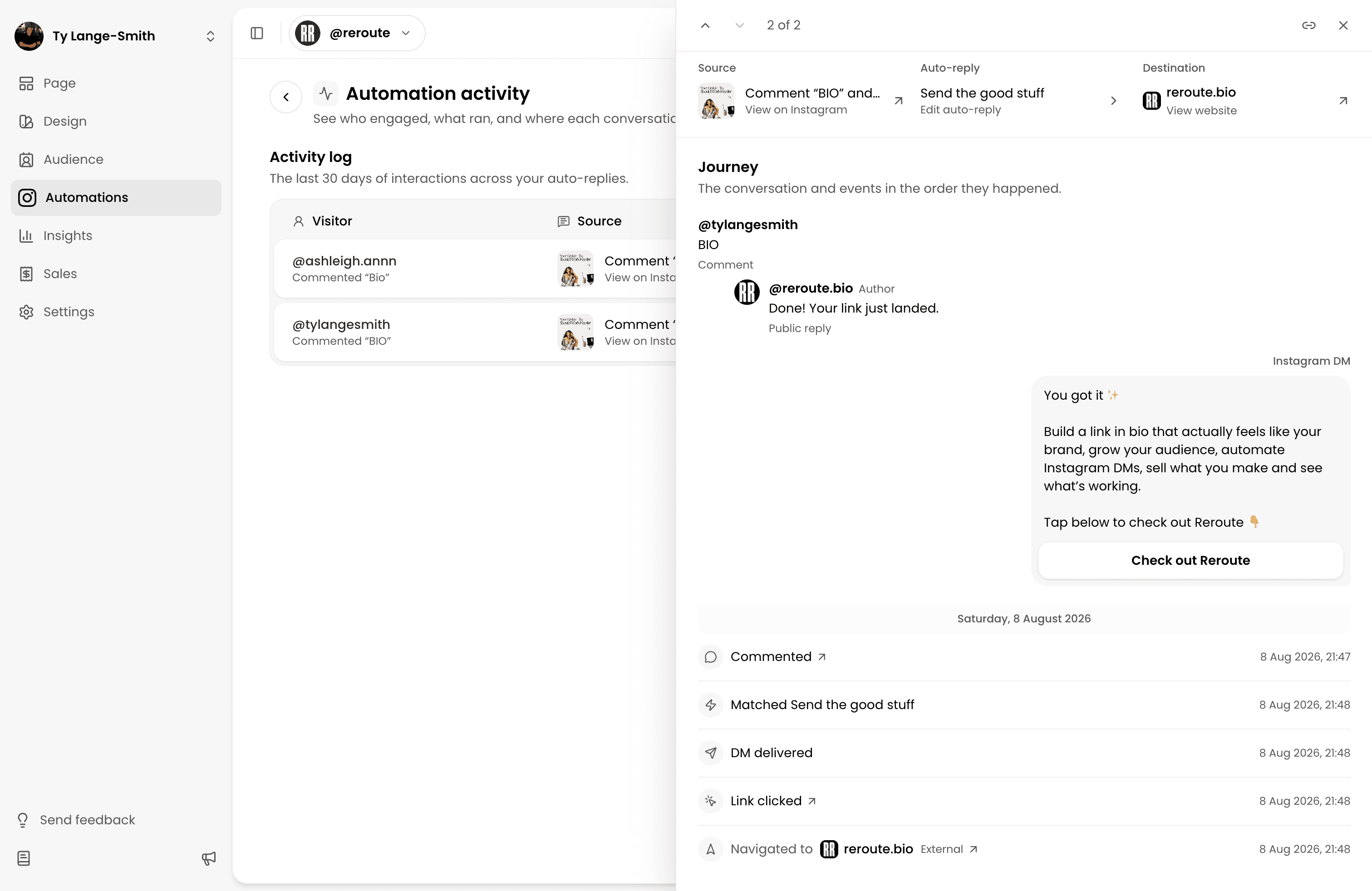
Comment count is the start of the route. It cannot tell you whether anyone opened the useful thing at the end. Instagram’s own Insights separate views, accounts reached, interactions, and accounts engaged. Keep that post-level context beside Reroute's delivery and click data.
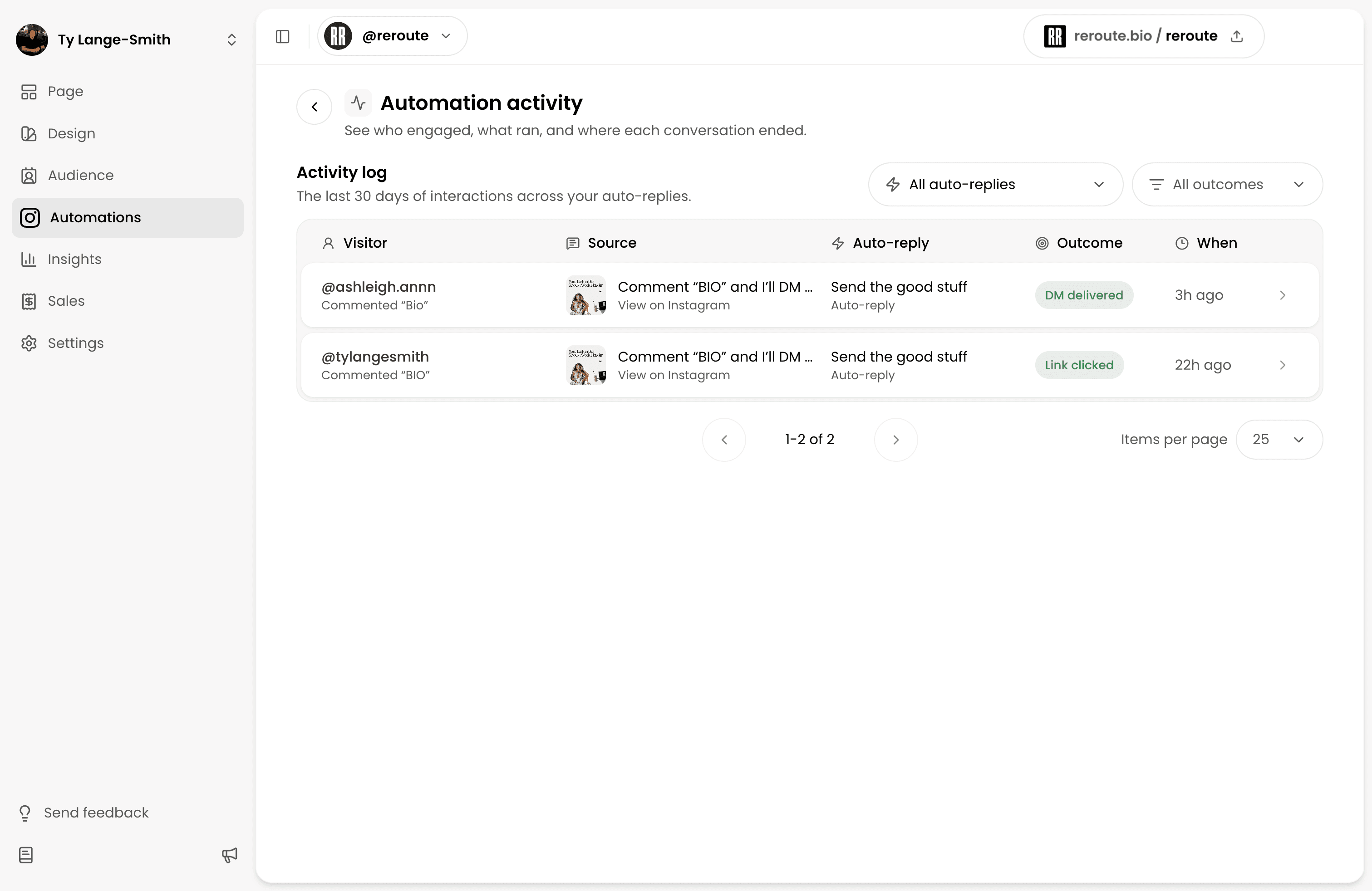
Track the route in stages:
| Stage | What it tells you | Where to look |
|---|---|---|
| Matching comments | The prompt created explicit interest | Reroute Automation activity |
| Messages sent | Instagram accepted the private reply | Reroute Automation activity |
| Link clicks | The message gave people a reason to continue | Reroute Automation results |
| Final action | The destination did its job | Your form, scheduler, store, or checkout |
For a simple review, calculate:
Keep the 2 rates separate. A low message click rate points toward the private message, button label, or Message Requests. A low destination conversion rate points toward the page, offer, form, scheduling flow, or checkout.
Avoid treating this workflow as an algorithm trick. Instagram does not promise extra reach because a post uses automated replies. Even eligibility for Instagram recommendations does not guarantee a post will be recommended. Judge the campaign by whether it served the people who asked and produced the action you intended.
Limits and troubleshooting
The most common failure is a mismatch somewhere along the route. Work through these checks in order.
| What happened | What to check |
|---|---|
| The Automation never saw the comment | Confirm the Instagram connection is healthy and the Automation is on. |
| The comment appears as “No match” | Check the post scope and keyword. Use a word that appears plainly in the comment. |
| An older comment did not receive a message | Meta’s private-reply window closes 7 days after the comment. |
| Reroute says the message was sent, but the person cannot see it | Ask them to check Message Requests. Non-followers may receive it there. |
| The message arrived without useful context | Put the resource name and reason for the message in the first DM. |
| Clicks are healthy, but signups or sales are low | Test the destination on mobile and inspect its own conversion steps. |
| New comments stopped triggering | Check your monthly allowance and Instagram connection status. |
At the time of writing, Free includes 250 successful Automation starts each month, while Creator includes 10,000. A start counts when the private reply is successfully sent, rather than when an unrelated comment arrives.
Use the smallest audience that fits the campaign. A specific-post keyword trigger is safer than replying to every comment across every post. Broad triggers can send unwanted messages to people who were only joining the public conversation.
Frequently asked questions
Start with one useful reply
Choose a post where people already ask for the link, price, resource, recipe, template, or booking details. Pick one clear keyword and send them exactly what they asked for. Test the automation from a second account, then switch it on.
Set up an Instagram auto reply